![logo-shironuki-1.png]](https://connect.lumo.cx/hs-fs/hubfs/logo-shironuki-1.png?height=40&name=logo-shironuki-1.png)
-
Cause
The main reasons why segments (lists) may not appear are as follows:
- Cached data is used when retrieving data from HubSpot
- The segment (list) was created recently and has not yet been reflected in LITTLE HELP CONNECT
- The data displayed on the screen is not up to date
Reflection Timing
The time it takes for HubSpot segments (lists) to be reflected in LITTLE HELP CONNECT varies depending on the use case.
1. Segment Name (List) Display
- Usually: Immediate to up to 30 minutes
- Reason: CONNECT caches data for up to 30 minutes
2. Segment (List) as a Delivery Target
- Retrieved almost in real time
- The latest data is fetched directly from HubSpot at the time of message delivery
3. LINE User Synchronization (Reference)
- Runs once per day (batch process at midnight)
- It may take up to 24 hours for updates to be reflected
Solution
If you want the segment to appear immediately, please follow the steps below:
Please click the “Update” button located to the right of the segment input field.
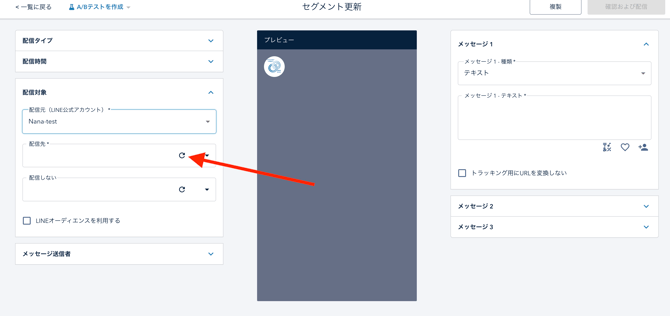
This will clear the cache and retrieve the latest data from HubSpot immediately.
-
If the Issue Persists
If the segment still does not appear after trying the above steps, please contact our support team: