![logo-shironuki-1.png]](https://connect.lumo.cx/hs-fs/hubfs/logo-shironuki-1.png?height=40&name=logo-shironuki-1.png)
-
Last updated: 2026/9/8
Benefits of This Feature- Combining HubSpot customer data with LINE platform audiences enables more precise segment delivery
- Detailed targeting is achieved using user attribute information (gender, age, region, etc.)
- Audiences already created in the LINE Official Account can be effectively leveraged
- Improved marketing effectiveness and optimized cost efficiency can be expected
Users included in a HubSpot list can be further narrowed down using LINE's audience feature.
Available Filtering Conditions
Delivery using a LINE Official Account audience supports targeting based on the following conditions:
- Audience
- Select from audiences already created in the LINE Official Account
- Behavioral history of users within the LINE Official Account
- Configured tag information
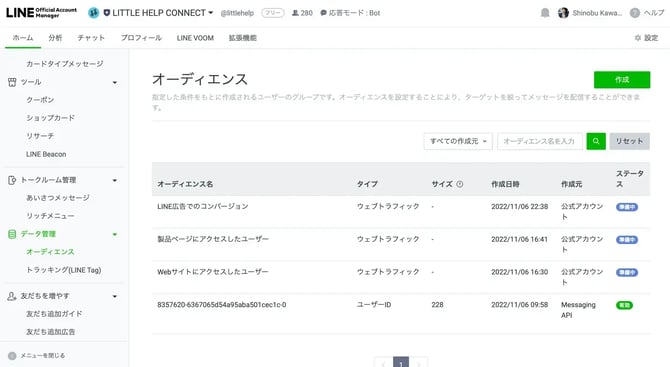
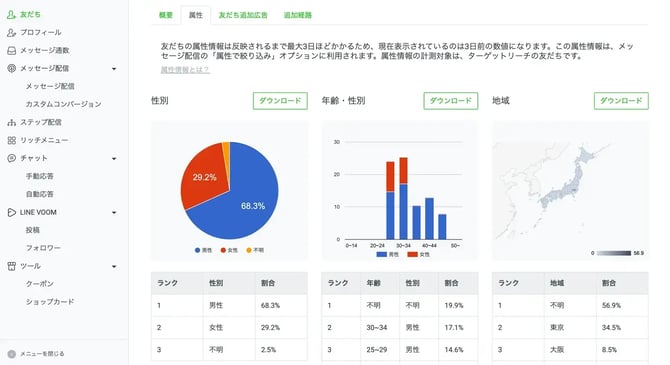
- 2.Attribute filter (LINE audience) — the delivery target can be narrowed using the following attributes:
- Gender
- Age
- OS type
- Region
- Days elapsed since adding as a friend
- Setup Steps
- Configure the LINE audience
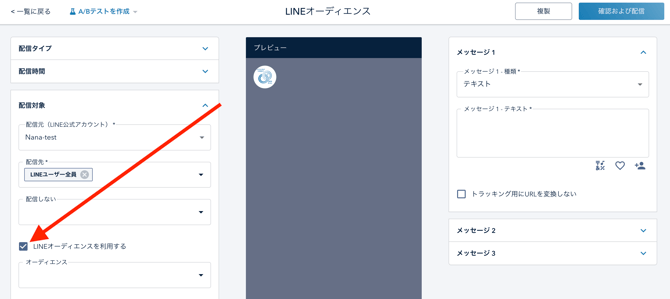
- Open "Delivery target" on the message delivery settings screen
- Check "Use LINE audience"
- The selection fields appear; set the conditions you need:
- Audience selection: choose from audiences already created in the LINE Official Account
- Attribute filter settings: choose the needed conditions from gender, age, OS, region, and friend duration
- Run delivery and check results
- Once setup is complete, run message delivery as usual
- After delivery, delivery performance can be checked on the detail screen
- Configure the LINE audience
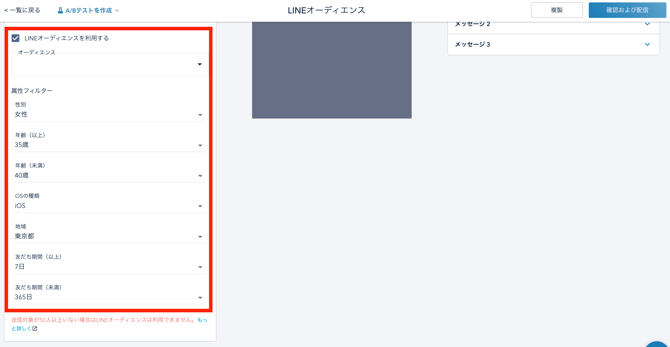
- 3.Configure necessary conditions from the displayed selection items:
-
- Audience Selection: Choose from audiences created in LINE Official Account
- Attribute Filter Settings: Select necessary conditions from gender, age, OS, region, friend duration
2. Delivery Execution and Results Confirmation
- After completing settings, execute message delivery as usual
- After delivery, you can check delivery performance on the detail screen
-
-
About the Delivery Mechanism
Delivery using the LINE audience feature has the following characteristics:
Narrowing with AND conditions: When a delivery list, LINE audience, and attribute filter are all set, delivery goes to recipients who satisfy every one of those conditions.
- Example: If a delivery list, a LINE audience, and an attribute filter are all set → the delivery target is anyone who is in the delivery list, AND also matches the LINE audience condition, AND also matches the attribute filter condition.
- If no LINE audience is selected and only an attribute filter is set → the delivery target is anyone who is in the delivery list AND also matches the attribute filter condition.
Exclusion segments are applied: HubSpot segments set to "do not deliver" (exclusion segments) are still excluded even when the LINE audience feature is used. Contacts matching an exclusion segment are removed from the AND-narrowed target described above before delivery.
Source of audience/attribute filter data: Audience behavioral history and attribute information such as gender, age, and region are judged based on data held by LINE.
Regarding individual recipient visibility: Because matching against the LINE audience/attribute filter conditions is performed on LINE's side, LITTLE HELP CONNECT cannot individually confirm exactly who ended up receiving the message (see "Tracking limitations" below for details).
Important Constraints
Due to user privacy protection, the following constraints apply when using the LINE audience feature:
Constraints on Delivery Volume
- The number of recipients must be 50 or more
- If this threshold is not met, the LINE audience feature cannot be used
- If the number of recipients is fewer than 50, delivery will result in an error
Tracking Limitations
- No individual user tracking: Reach, opens, and clicks cannot be tracked on a per-user basis
- Small numbers are hidden: If reach, opens, or clicks are fewer than 20, they are displayed as "0"
- Contact tokens cannot be used: Because delivery/matching is based on friend information held by LINE, tokens cannot be used
- No user list display: Overall totals are shown, but individual users are not shown in a list
Constraints on List Settings
- A delivery list is required: The audience alone cannot be used on its own within LITTLE HELP CONNECT
- Narrowing with AND conditions: When a delivery list, LINE audience, and attribute filter are set, delivery goes to recipients matching all of those conditions (AND condition)
- Exclusion segments remain in effect: Lists set to "do not deliver" (exclusion segments) are still excluded even when using the LINE audience
Tips
- Can be used together: A delivery list and an audience can be used in combination
- Progressive narrowing: Starting from a HubSpot list, you can further narrow the target using LINE audience settings and/or attribute filters (AND condition)
- Exclusion segments still apply: Even when using a LINE audience or attribute filter, "do not deliver" exclusion segments are still applied
- Attribute filter alone is supported: You can deliver using only an attribute filter, without selecting an "Audience"
- Flexible combinations: Delivery lists, audiences, and attribute filters can be freely combined
- Also available in Lumo: Lumo also supports delivery that combines a HubSpot delivery list/exclusion segment with a LINE audience/attribute filter. The workflow of "using a LINE audience while excluding a specific HubSpot segment" is supported.
Frequently Asked Questions (FAQ)
About the Basic Feature
Q: Can a HubSpot list and a LINE audience be used together? A: Yes, they can be used together. You can use LINE audience settings to further narrow down a HubSpot list.
Q: When delivering with an audience, can I see who the message is sent to? A: Matching against the LINE audience/attribute filter conditions is performed on LINE's side, so LITTLE HELP CONNECT cannot individually confirm exactly who ended up as a recipient. However, due to the AND condition with the delivery list, the target is anyone who is in the delivery list AND also matches the LINE audience/attribute filter conditions.
Q: What happens when I combine a delivery list with an audience? A: The delivery list and audience are combined, and delivery goes to contacts that match both conditions (AND condition). You can further narrow with an attribute filter. In addition, if a "do not deliver" exclusion segment is set, that target is removed before delivery.
Q: Can I set only an attribute filter without selecting an audience? A: Yes, that's possible. If you set only an attribute filter without selecting an "Audience," delivery goes to recipients who match both the delivery list and the attribute filter (AND condition), with any exclusion segment removed first.
Q: Can delivery be done using only an audience, with no list? A: No, a delivery list setting is required. The audience cannot be used on its own within LITTLE HELP CONNECT.
Q: Are HubSpot exclusion segments ("do not deliver" lists) still applied when using a LINE audience? A: Yes, they are still applied. Even when using the LINE audience feature, HubSpot segments set to "do not deliver" remain excluded.
About How Delivery Works
Q: How does delivery work when using a LINE audience? A: When a delivery list, LINE audience, and attribute filter are set, delivery goes to recipients who satisfy every one of those conditions (AND condition). Matching against the LINE audience/attribute filter uses friend information held by LINE.
Q: If I set both a delivery list and a LINE audience/attribute filter, does it become an AND condition? A: Yes, it becomes an AND condition. When a delivery list, LINE audience, and attribute filter are set, the delivery target is anyone who is in the delivery list, AND also matches the LINE audience condition, AND also matches the attribute filter condition (i.e., matches all conditions). If an exclusion segment is set, that target is removed before narrowing.
Q: Is the exclusion list ("do not deliver" setting) still in effect? A: Yes, it is in effect. Even when filtering using a LINE audience, lists set to "do not deliver" (exclusion segments) remain excluded from the target.
Q: Why can't tokens be used? A: Because matching against the LINE audience/attribute filter uses friend information held by LINE, LITTLE HELP CONNECT contact information (including tokens) cannot be used for that portion.
Troubleshooting
Q: I can't use the LINE audience feature A: Check whether the number of recipients is 50 or more. You'll need to relax the conditions to increase the number of recipients.
Q: The delivery count isn't showing (displayed as 0) A: This is expected behavior — reach, opens, and clicks are displayed as "0" when the count is fewer than 20. Consider delivering to a larger audience.
Q: I can't see individual user information A: When using a LINE audience, individual user information is not displayed, in order to protect user privacy. Only aggregate statistics are available.
Reference Information
LINE Official Reference Materials